Edit video by talking to Claude: in any language, right to left included
You have forty minutes of interview and you need ninety seconds of promo. Or a script for a product video and a folder of screen recordings. Or a lecture that should become five Reels.
An editing app doesn't know which sentence is the point. You do, and you can say what you want in one sentence: "open with the line about the factory, cut the ums, a lower third for the CEO, captions, and a vertical version." video-factory turns that sentence into the edit.
What it is
A skill for Claude Code and a command-line tool beside it. The skill decides: what each part is about, which parts tell the story and in what order, what to clean, where a graphic goes. The tool does the mechanical work with FFmpeg, whisper.cpp and HyperFrames. You get a finished final.mp4, and editing never leaves your machine.
It works in any language Whisper transcribes. Hebrew gets its own transcription model, and right-to-left captions and graphics come out in the right order. That is where most editors fail. Descript transcribes Latin-script languages only. OpusClip says it does not support right-to-left languages. Premiere Pro has no Hebrew speech-to-text, and DaVinci Resolve has no built-in Hebrew transcription.
How it works
Every word gets a time. Transcription runs locally with whisper.cpp. Hebrew uses the ivrit.ai model, which is far better at Hebrew, and every other language uses the multilingual model. The project remembers its language, and every later step follows it: which hesitation sounds to cut, which way captions read, which side a lower third sits on.
Claude reads the transcript and splits it into parts, one idea each. Then it proposes a story, with a reason for every part, and waits for your approval before rendering anything. A cut that lands inside a word moves out to the silence beside it.
After every render a check runs: length against the plan, frame size, video and audio streams, captions. A render that fails it is not reported as done.
Six things to use it for
1. A promo from an interview
Make a 45-second promo for ACME from ~/Footage/acme: the CEO interview, factory b-roll, our logo and colours, a chart of customers by year, music, and a Reels version.
The project links to your footage instead of copying it, and the originals are never written to. Claude cuts the interview into topics and proposes an order. It covers the factory talk with factory shots, opens with a title card, adds a lower third with the CEO's name, and builds a bar chart from the numbers you gave. Music ducks under speech. The Reels version comes from the same story, cropped to 9:16.
2. A product video from a script
Write a 30-second script for our app, narrate it with Azure, and cut the screen recordings in ~/Desktop/app to it.
Here the script sets the timing, not the footage. Each paragraph becomes a beat, the narration is generated and timed beat by beat, and the visuals are placed against it. ElevenLabs, Azure, Google and OpenAI voices are supported. The free macOS voice is there to time the edit before you pay for the real one. Captions follow the narration word by word.
3. Shorts from a long video
Find the best moments for Reels in this podcast. Five clips of 30 to 45 seconds.
The tool ranks stretches of the transcript that could stand on their own: a hook up front, numbers, pace, a complete ending. Claude reads them in full and picks clips that make sense with no context and end on a payoff. Each one renders vertical, cleaned, with captions one word at a time, a hook title in the top third, your logo and an end card.
4. A Hebrew lecture with right-to-left captions
תתמלל את השיעור, תוריד את האממ, ותוסיף כתוביות קריוקי מימין לשמאל.
This is the case the tool was built around. The words come out in the right order, the highlight moves from right to left, and a Hebrew title card aligns to the right. The same project in English puts the title on the left and the lower third on the left side, without anyone choosing it.
5. The whole edit on a timeline, in the browser
Make a review page for the client.
You get one HTML file beside the video. It needs no server and no editing app: double-click it, or send it with the video. Under the video is a timeline of every track, the way an editing app shows it: the parts with the transition at each junction, the graphics, the b-roll, the captions and the music, with a playhead that follows playback.
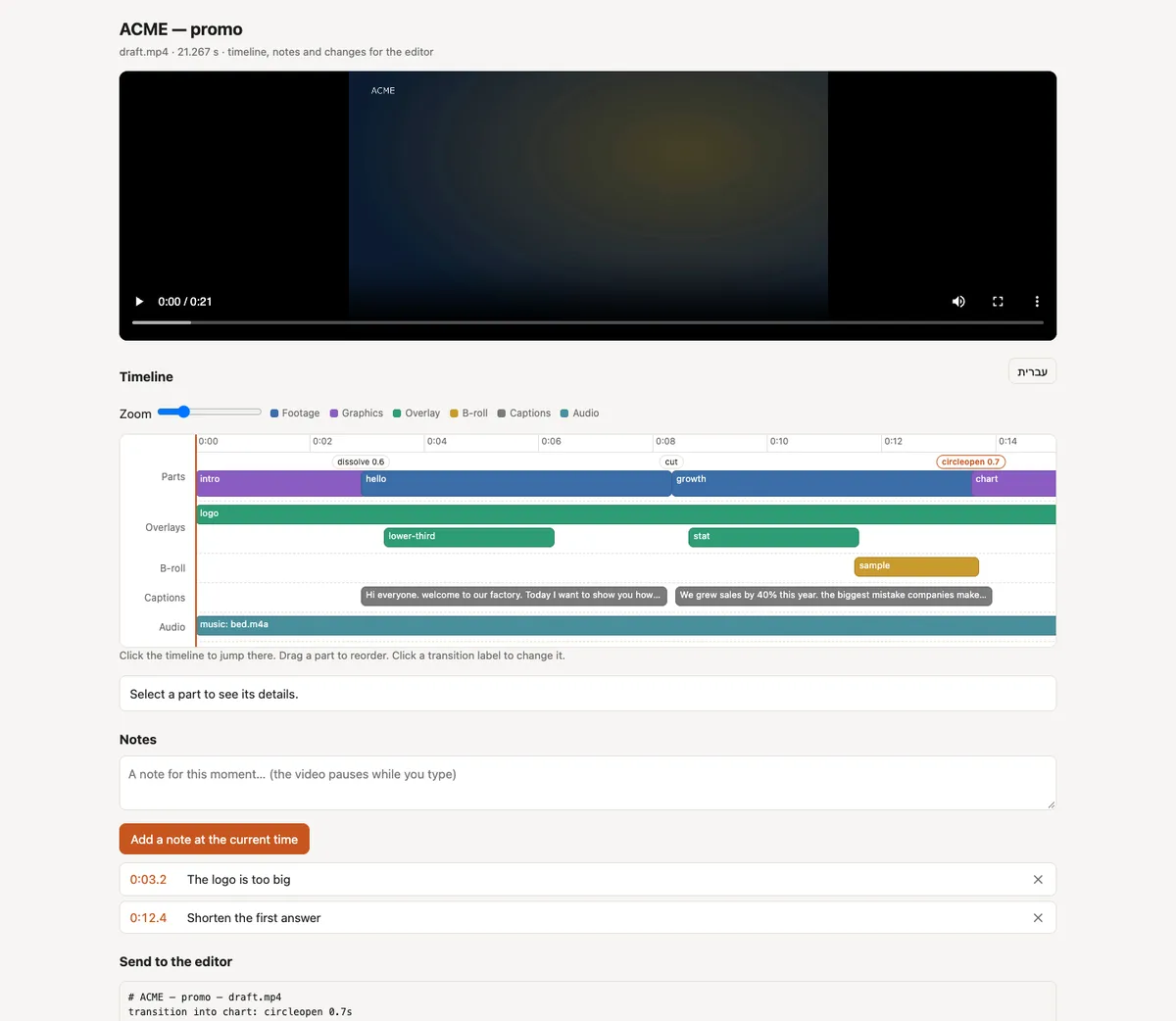
On the timeline you, or the client, can drag parts into a new order, change any transition, and pause to leave a note at a timestamp. Everything comes back as one block of text:
order: intro, chart, hello, how, outro
transition into chart: circleopen 0.7s
0:03.2 — the logo is too big
Paste it to Claude, which applies it and renders again. If the client works in Premiere, Resolve or Final Cut, the edit also exports as an FCPXML, EDL or OTIO timeline that points at the original files.
6. Footage with no one talking
There's no talking, it's travel footage. What's in it?
With no words to read, Claude reads timecoded contact sheets and writes down what each shot shows. A vision model you choose can watch as well, if you want one. It logs the shots and marks which are usable as b-roll. It scores shorts on what happens on screen, and it checks the final render for text over a face or a head cut off by the crop. By default that model runs on your machine, in LM Studio or Ollama. A cloud model is refused unless you allow it, because the client's footage would leave your machine.
Copying the style of a video you like
Give it a video you like, an ad or a competitor's promo, and it measures the pace: shot lengths, cuts per minute. It looks at the frames around each cut to tell a hard cut from a dissolve or a wipe. Claude writes that down as a style and carries it into your edit. "Like the last video" works the same way.
Limits
- No editing window. You work in a conversation. The review page and the timeline export are how you see the edit and hand it on.
- No generated footage, avatars or lip-sync, and no stock library.
- Shorts are picked by judgement, Claude's, plus an optional visual score. There is no trained virality model behind them.
- It is new. I tested it end to end on test clips with synthetic voices, in Hebrew, English and Spanish: renders, versions, shorts, the review page and a local vision model.
video-factory is open source (MIT): github.com/yybd/video-factory. The README lists what you can ask for, and docs/ has every command, in English and Hebrew. You need Claude Code, FFmpeg with libass, whisper.cpp with a model, and Node.js for the graphics.